

Fit Multiple Observations#
This tutorial shows how to model sources from images observed in different ways, which could mean images taken with the same instrument but different pointings and PSFs, or with different instruments. For this guide we will use a multi-band observation from the Hyper-Suprime Cam (HSC) and a single high-resolution image from the Hubble Space Telescope (HST).
# Import Packages
import astropy.io.fits as fits
import astropy.units as u
import jax.numpy as jnp
from astropy.coordinates import SkyCoord
from astropy.table import Table
from astropy.wcs import WCS

import scarlet2 as sc2

sc2.set_validation(False)
Load Data#
We first load the HSC and HST images, PSFs and weight/variance maps. We also load a catalog of sources detected jointly from the observations (see here for details on how this catalog was created).
from huggingface_hub import hf_hub_download

filename = hf_hub_download(
    repo_id="astro-data-lab/scarlet-test-data",
    filename="multiresolution_tutorial/data.fits.gz",
    repo_type="dataset",
)

with fits.open(filename) as hdul:
    # Load HSC observation
    data_hsc = jnp.array(hdul["HSC_OBS"].data, jnp.float32)
    wcs_hsc = WCS(hdul["HSC_OBS"].header)

    # Load HSC PSF and weights
    psf_hsc_data = jnp.array(hdul["HSC_PSF"].data, jnp.float32)
    obs_hsc_weights = jnp.array(hdul["HSC_WEIGHTS"].data, jnp.float32)

    # Load HST observation
    data_hst = jnp.array(hdul["HST_OBS"].data, jnp.float32)
    wcs_hst = WCS(hdul["HST_OBS"].header)

    # Load HST PSF and weights
    psf_hst_data = jnp.array(hdul["HST_PSF"].data, jnp.float32)
    obs_hst_weights = jnp.array(hdul["HST_WEIGHTS"].data, jnp.float32)

    # Load catalog table and metadata
    coords_table = Table(hdul["CATALOG"].data)
    radecsys = hdul["CATALOG"].header["RADECSYS"]
    equinox = hdul["CATALOG"].header["EQUINOX"]

# Write sources coordinates in SkyCoord
ra_dec = SkyCoord(
    ra=coords_table["RA"] * u.deg,
    dec=coords_table["DEC"] * u.deg,
    frame=radecsys.lower(),
    equinox=f"J{equinox}",
)
Warning: You are sending unauthenticated requests to the HF Hub. Please set a HF_TOKEN to enable higher rate limits and faster downloads.
Now we create scarlet2 observations and display their contents:
# Scarlet Observations
obs_hst = sc2.Observation(
    data_hst,
    wcs=wcs_hst,
    psf=psf_hst_data,
    channels=["F814W"],
    weights=obs_hst_weights,
    name="HST"
)

obs_hsc = sc2.Observation(
    data_hsc,
    wcs=wcs_hsc,
    psf=psf_hsc_data,
    channels=["g", "r", "i", "z", "y"],
    weights=obs_hsc_weights,
    name="HSC"
)

norm_hst = sc2.plot.AsinhAutomaticNorm(obs_hst)
norm_hsc = (sc2.plot.AsinhAutomaticNorm(obs_hsc))

sc2.plot.observation(
    obs_hst, norm=norm_hst, sky_coords=ra_dec, show_psf=True, label_kwargs={"color": "red"}
);
sc2.plot.observation(obs_hsc, norm=norm_hsc, sky_coords=ra_dec, show_psf=True);
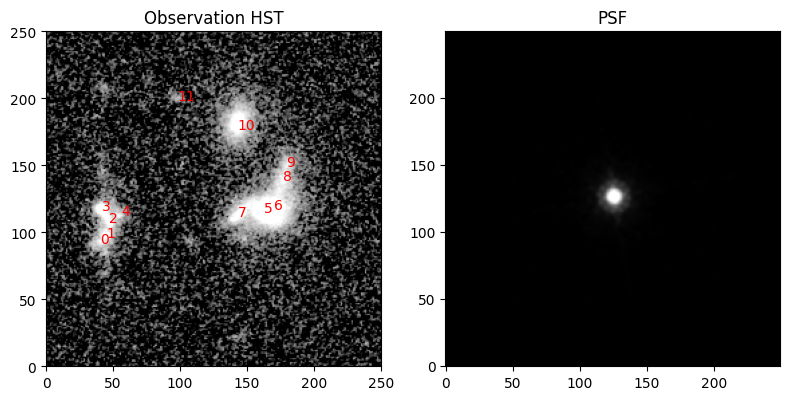
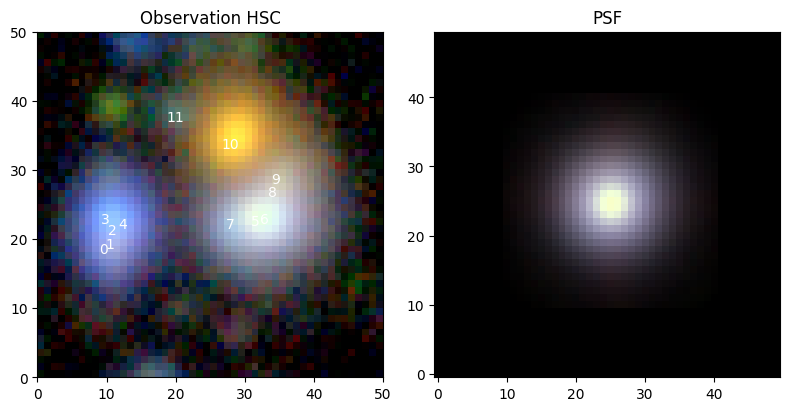
Create Frame and Observations#
We have two different instruments with different pixel resolutions, so we define a model frame that allows us to unify these data:
model_frame = sc2.Frame.from_observations(
    observations=[obs_hst, obs_hsc],
    coverage="union",  # or "intersection"
)
In addition to defining a common footprint for both observations, the model frame adopts the HST resolution because the HST image has the highest resolution. The channels of both observations are simply concatenated, which means the bands are treated independently across observations even though the wavelengths may overlap.
Initialize Sources from Multiple Observations#
The initialization of the sources follows our general recommendation (from e.g. the quickstart guide), with the only difference that multiple observations are passed to the init functions:
with sc2.Scene(model_frame) as scene:
    for i, center in enumerate(ra_dec):
        try:
            spectrum, morph = sc2.init.from_gaussian_moments([obs_hst, obs_hsc], center, min_corr=0.99,
                                                             min_snr=3)
        except ValueError:
            spectrum = sc2.init.pixel_spectrum([obs_hst, obs_hsc], center)
            morph = sc2.init.compact_morphology()
        sc2.Source(center, spectrum, morph)
from numpyro.distributions import constraints
from functools import partial

spec_step = partial(sc2.relative_step, factor=0.05)
morph_step = partial(sc2.relative_step, factor=1e-3)

with sc2.Parameters(scene):
    for i in range(len(scene.sources)):
        sc2.Parameter(
            scene.sources[i].spectrum,
            name=f"spectrum.{i}",
            constraint=constraints.positive,
            stepsize=spec_step,
        )
        sc2.Parameter(
            scene.sources[i].morphology,
            name=f"morph.{i}",
            constraint=constraints.unit_interval,
            stepsize=morph_step,
        )
Fit Multiple Observations#
The definition of parameters is completely independent of observations, so nothing changes here:
We could now simply call:
sc2.fit(scene, [obs_hst, obs_hsc], max_iter=1000, progress_bar=True)
And this would work, but it would take a long time. The rendering operator for the HSC observation has to change resolution. This operation is much slower than, say, a simple convolution at the same resolution. We therefore resample the HSC observation to the pixel grid of the model frame (which in itself has inherited its pixel grid from the HST observation):
obs_hsc_corr = sc2.CorrelatedObservation.from_observation(obs_hsc, resample_to_frame=model_frame)

norm_hsc_corr = sc2.plot.AsinhAutomaticNorm(obs_hsc_corr)
sc2.plot.observation(obs_hsc_corr, norm=norm_hsc_corr, sky_coords=ra_dec, show_psf=True);
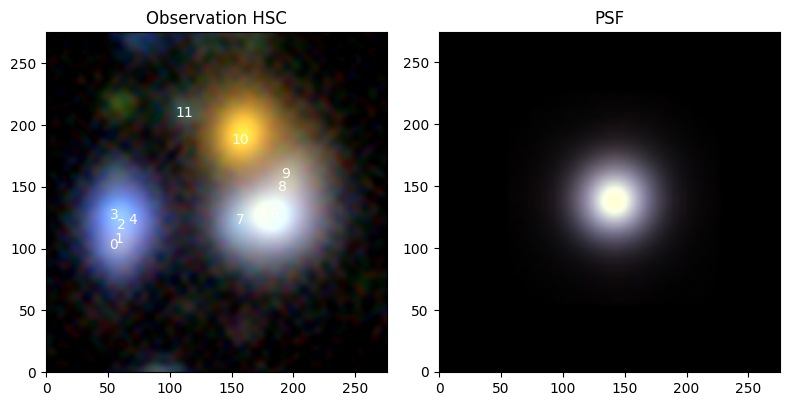
The new observation does not require resampling during the fit. And because the resampling correlates the pixel values, we automatically treat it as a CorrelatedObservation.
For good measure, we should also account for the pixel correlations in the HST data, which arose because the HST single exposures were also resampled when the HST coadd was created (see the tutorial on correlated data for more details). Since the HST and the model frame share the same pixel grid, we don’t need to resample to the model frame here:
obs_hst_corr = sc2.CorrelatedObservation.from_observation(obs_hst)
We can now pass both observations to the fitting method:
scene_ = scene.fit([obs_hst_corr, obs_hsc_corr], max_iter=1000, progress_bar=True)
Let’s check the results:
sc2.plot.scene(
    scene_,
    observation=obs_hst_corr,
    show_rendered=True,
    show_observed=True,
    show_residual=True,
    add_labels=True,
    add_boxes=True,
    norm=norm_hst,
    box_kwargs={"edgecolor": "red", "facecolor": "none"},
    label_kwargs={"color": "red"},
)
sc2.plot.scene(
    scene_,
    observation=obs_hsc_corr,
    show_rendered=True,
    show_observed=True,
    show_residual=True,
    add_labels=True,
    add_boxes=True,
    norm=norm_hsc_corr,
);
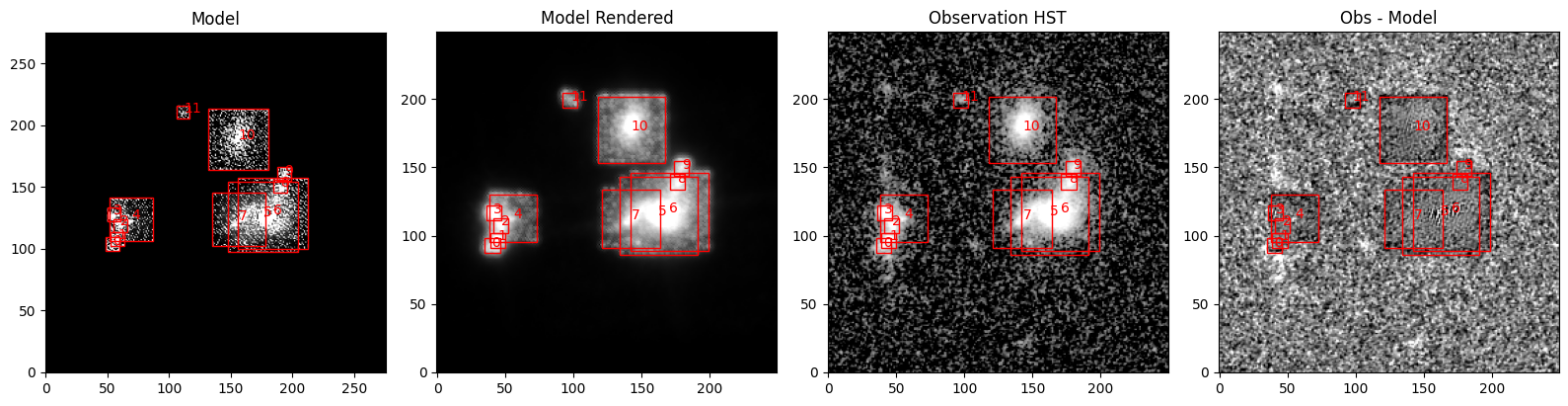
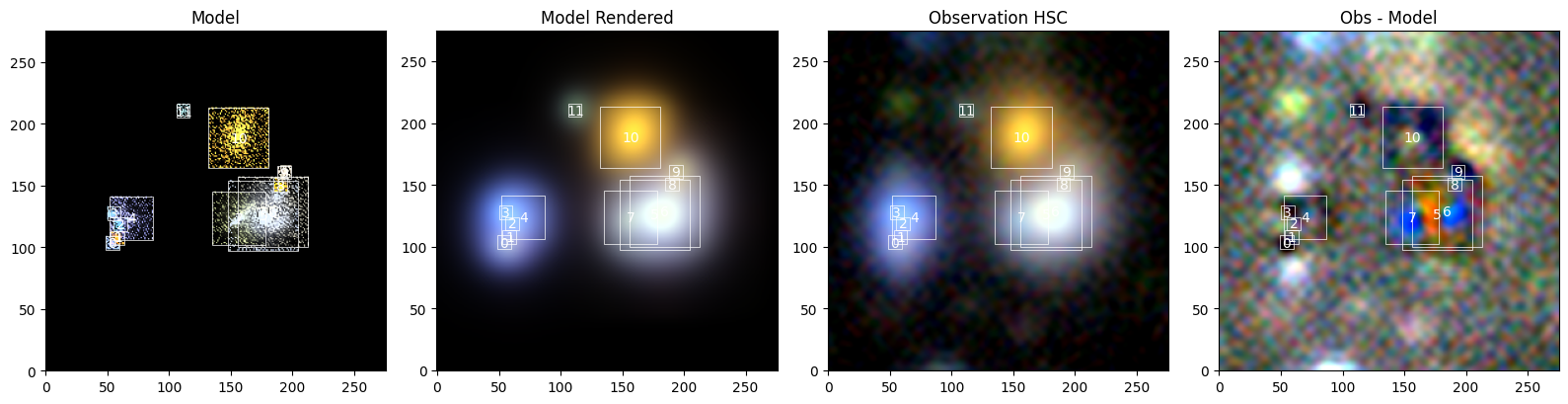
The fit is quite good, but issues remain:
The model is still quite noisy in the outskirts. We are currently developing morphology priors for space-based imaging which should improve the reconstruction fidelity.
The boxes are too small, so some flux, e.g. around source 10, is not modeled. Better detection footprints would help the initialization of sources.
There are minor dipoles in the residuals (best seen for source 10), which skew in the opposite directions between the two observations (the top-right is positive in HST, while the top-right is negative in HSC). That could imply that the astrometry between the HSC and HST is slightly inconsistent.
Let’s see how we can fix that:
Fit Astrometric Offsets#
We can treat this offset by understanding that each observation has a Renderer, which maps the modeled scene onto the observation. The figures above show this operation in the column called “Model Rendered”. The renderers here perform a convolution and have an attribute .shift, which, well, shifts the convolved image. We can use this attribute as a Parameter, which means that we treat the observation as a model that can be optimized, just like scene.
Tip
Because the astrometric offset is relative, it’s sufficient to only shift one observation (or more precisely: all but one). The observation whose shift we do not adjust thus defines the astrometric reference. Without this fixed anchor, all observations can be shifted by an arbitary amount, which would make the fitter or sampler unhappy: it’s a perfect degeneracy.
So let’s define the shift parameter for the HSC observation only, and fit the same scene again. As we will update scene and observations, we need the more flexible fitting function scarlet2.fit() rather than scene.fit.
# making sure that the renderer exists
obs_hsc_corr.check_set_renderer(model_frame)

# define shift parameter: unconstrained, with milli-arcsec stepsize
import astropy.units as u

with sc2.Parameters(obs_hsc_corr):
    sc2.Parameter(obs_hsc_corr.renderer[1].shift, name="shift", stepsize=1e-3 * u.arcsec)

# the more flexible fitter optimizes scene and observations and returns both
scene_, (_, obs_hsc_corr_) = sc2.fit(scene, [obs_hst_corr, obs_hsc_corr], e_rel=1e-3, max_iter=1000)

# get the astrometry shift
shift = obs_hsc_corr_.get("shift")
print(f"Shift in model pixels: {shift}")
Shift in model pixels: [-0.63751775 -0.65224004]
The fit is slightly better than before, but let’s see if the models look better:
sc2.plot.scene(
    scene_,
    observation=obs_hst_corr,
    show_rendered=True,
    show_observed=True,
    show_residual=True,
    add_labels=True,
    add_boxes=True,
    norm=norm_hst,
    box_kwargs={"edgecolor": "red", "facecolor": "none"},
    label_kwargs={"color": "red"},
)
sc2.plot.scene(
    scene_,
    observation=obs_hsc_corr_,
    show_rendered=True,
    show_observed=True,
    show_residual=True,
    add_labels=True,
    add_boxes=True,
    norm=norm_hsc_corr,
);
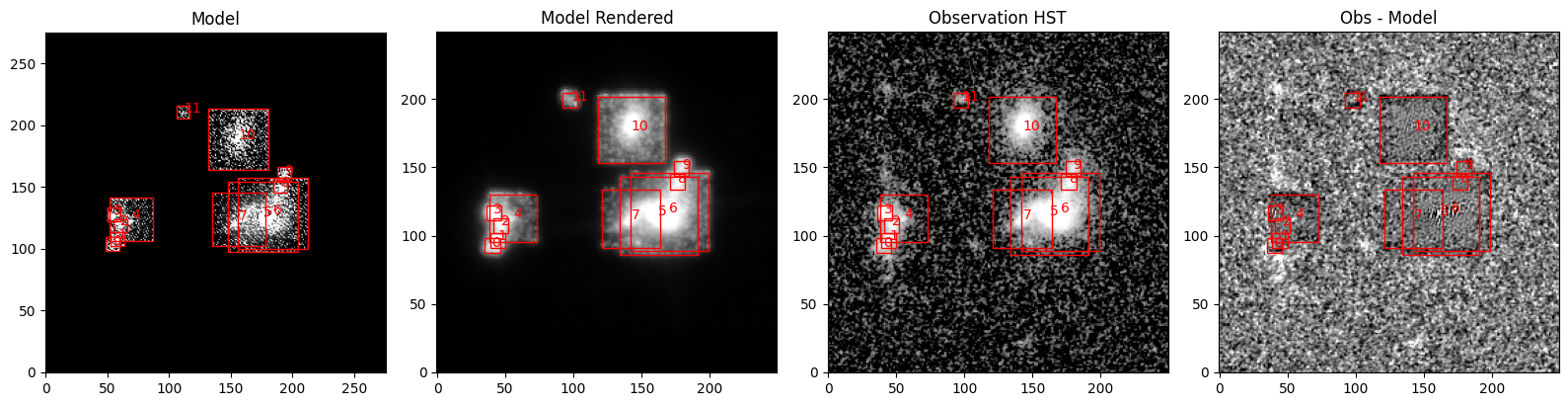
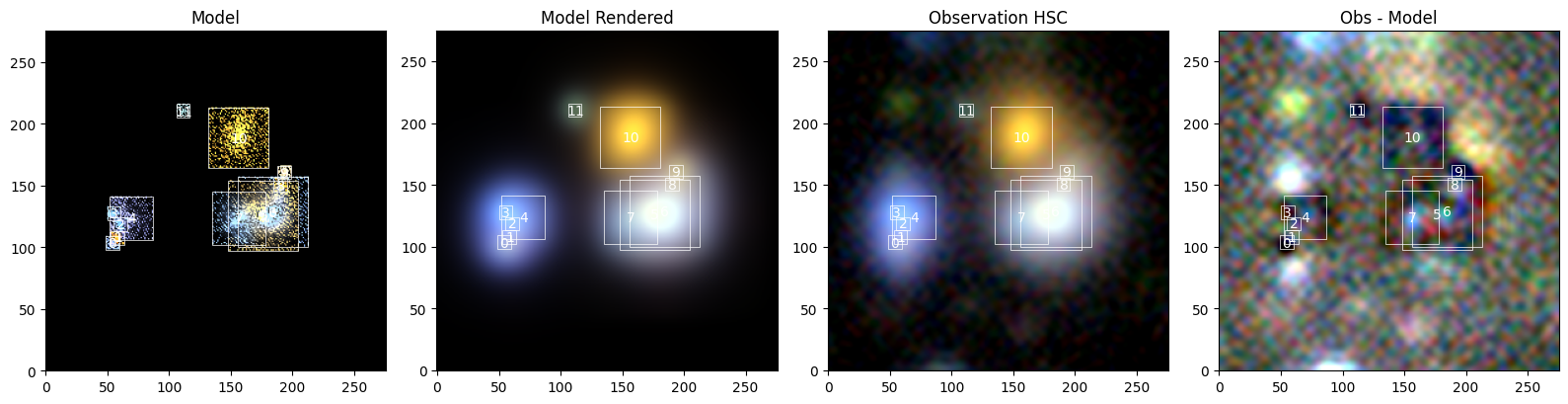
The dipole has indeed vanished! This leaves us with only last question: We have fit the resampled HSC observation, but does the model actually describe the original HSC data?
Correct Astrometry in Native Resolution#
We can simply plot scene_ against the original obs_hsc, but we wouldn’t get correction for the astrometric offset, which is help by obs_hsc_corr. So, we need to use the WCSs of the observations to compute the shift in native pixels:
# using only the Jacobian tranform between the resampled and native HSC frame
# this ignores possible frame offset because the shift is relative
jacobian, _ = sc2.frame.get_relative_jacobian_shift(obs_hsc_corr_.frame, obs_hsc.frame)
shift_native = jacobian @ shift
print(f"Shift in native HSC pixels: {shift_native}")

# create the renderer for native HSC if not already there
obs_hsc.check_set_renderer(model_frame)
# force the renderer to use optimized value for shift
object.__setattr__(obs_hsc.renderer[-1], "shift", shift_native)
Shift in native HSC pixels: [-0.11384245 -0.11647142]
This is a pretty small shift, which may have been caused by differences in the stellar catalog used to define the astrometry in each observation or the centering algorithm for the PSF models. But let’s check out the model compared to the original HSC observation:
sc2.plot.scene(
    scene_,
    observation=obs_hsc,
    show_rendered=True,
    show_observed=True,
    show_residual=True,
    add_labels=True,
    add_boxes=True,
    norm=norm_hsc,
);
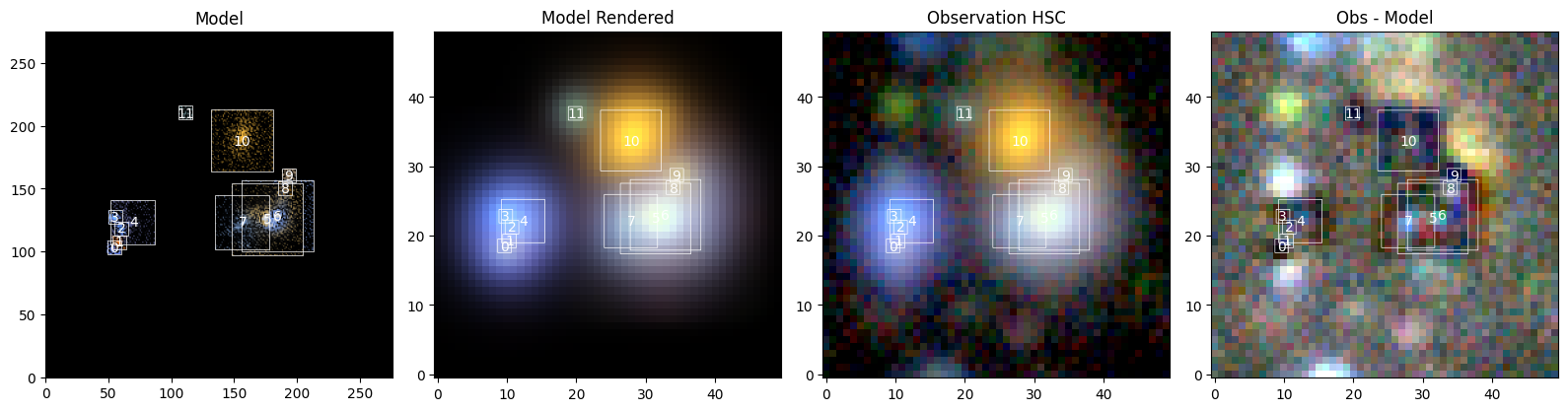
So, does a model trained on resampled data provide a good fit for the native data? Yeah, it does!