
Validation#
User guide - Automatic validation#
Working with scarlet2 provides users significant freedom when working with
Observation, Source and Scene objects.
In an attempt to provide guidance without restriction, we’ve implemented
a suite of validation checks that will run automatically at various points in a
scarlet2 workflow.
Note: These validation checks are designed to be efficient. If a validation check is performing poorly, please let us know by creating a GitHub issue explaining what you’re experiencing.
Currently automatic validation occurs when:
An instance of the
Observationclass is createdAn instance of the
Sourceclass is createdA user calls
Scene.fit()
Validation results#
Every individual validation check will return at least one ValidationResult
object which will one of the following types: Info, Warning, or Error.
All of the results will be printed along with information about the results of
the check.
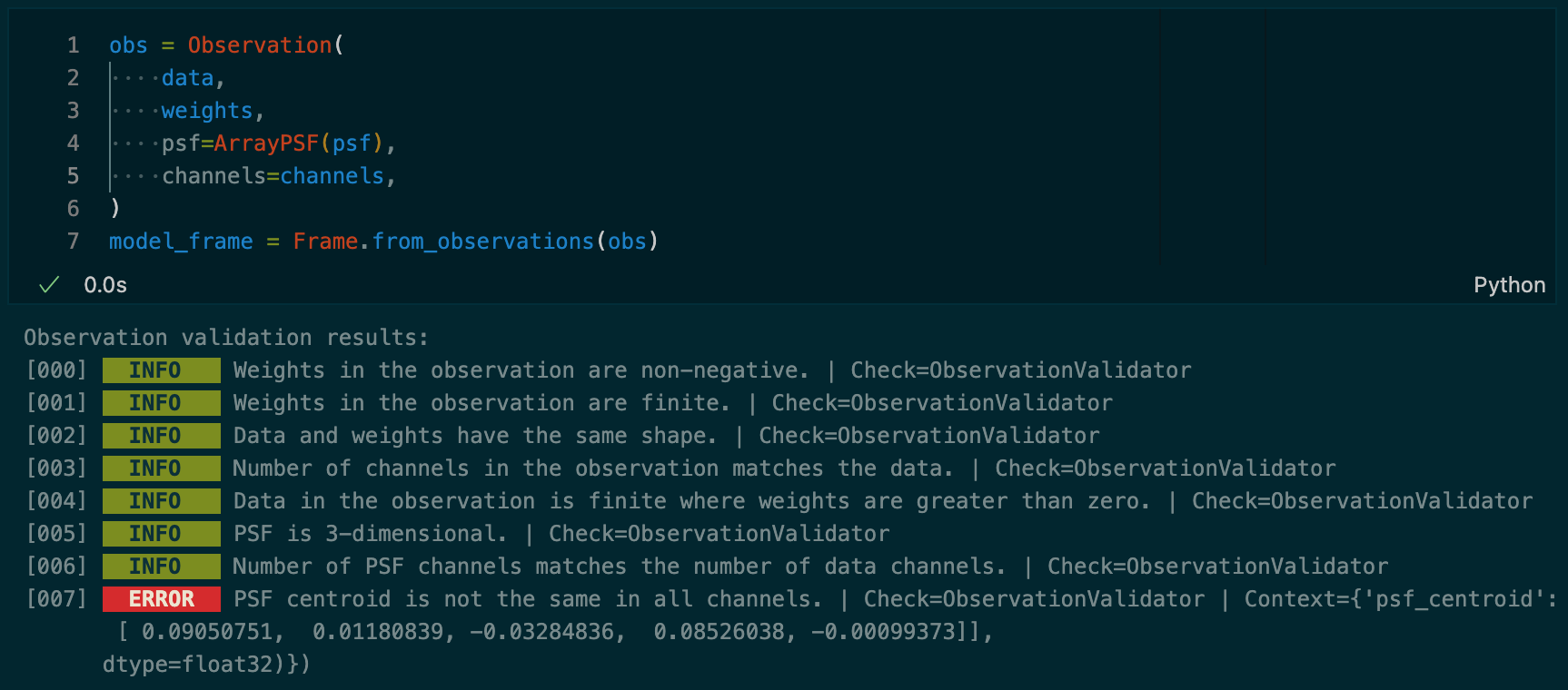
Below is an example screen shot from a jupyter notebook showing the creation of
a Observation object. All the checks returned ValidationInfo results with
the exception of the last, which returned a ValidationError.
Note: Validation checks will NEVER cause the program to halt. i.e. Even a
ValidationErrorwill not stop the execution ofscarlet2.
Toggling automatic validation checks#
Automatic validation checks are enabled by default, and because the results of validation checks will not halt the program, it is generally fine to leave them enabled.
However, if you’re running scarlet2 in a way that the logged output of
validation checks won’t be seen, or you feel that the checks are bothersome, they
can be togged as shown here:
from scarlet2.validation_utils import set_validation

# turn off automatic validation checks
set_validation(False)

# turn on automatic validation checks
set_validation(True)
Note: Turning off validation is not persistent. i.e. restarting
scarlet2will re-enable automatic validation.
Running validation checks manually#
If automatic checks are disabled, or you would like to run validation checks manually, the following functions are available:
check_fit(scene, observation)check_observation(observation)check_scene(scene, observation, parameters)check_source(source)
To nicely print the validation results, you can use the print_validation_results
function. An example of using check_observation to run Observation validation
checks together with print_validation_results to view the results would look
like this:
from scarlet2.validation import check_observation
from scarlet2.validation_utils import print_validation_results

# Assuming the automatic validation is toggled off, we'll create an Observation
observation = Observation(...)

# Run the Observation validation checks
validation_results = check_observation(observation)

# Pretty-print the results
print_validation_results(validation_results)
Dev guide - Implementing validation checks#
The goal of the validation checks is to provide guidance for users as they work with scarlet2.
Since guidance changes and the code base evolves, we want to encourage developing
and maintaining validation checks.
Here we include two examples to walk a developer through implementing new validation checks within the framework that has been established.
Example - Adding a new validation check#
Ideally when modifying existing code or extending API functionality, the developer will add corresponding validation checks.
Here we’ll imagine that a hypothetical method has been added to the Observation
class that will take the square root of a new input parameter obs_sqrt.
The user is free to provide any value for the new input parameter.
We’ll write a validation check to provide some guardrails for the user.
Write the basic validation check#
Validation checks are implemented as methods in a *Validation class that
is co-located with the class it is validating.
For this example all the validation checks for the Observation class are
contained in the observation.py module in a class named
ObservationValidator.
Well add the following method to the ObservationValidator class:
import numbers

def check_sqrt_parameter(self) -> ValidationResult:
    """Check that the parameter to be passed to the ``obs_sqrt`` function is
    reasonable.

    Returns
    -------
    ValidationResult
        An appropriate ValidationResult subclass based on the value of ``obs_sqrt``.

    obs_sqrt = self.observation.obs_sqrt

    if not isinstance(obs_sqrt, numbers.Number):
        return ValidationError(
            message="The value of `obs_sqrt` is not numeric",
            check=self.__class__.__name__,
            context={"obs_sqrt": obs_sqrt}
        )

    elif(obs_sqrt < 0.):
        return ValidationWarning(
            message="The value of `obs_sqrt` is < 0. This might be a mistake.",
            check=self.__class__.__name__,
            context={"obs_sqrt": obs_sqrt}
        )
    else:
        return ValidationInfo(
            message="The value of `obs_sqrt` looks good.",
            check=self.__class__.__name__,
        )
When adding a new validation check, it is required to use the following naming scheme:
check_<something>.
Failure to do so will mean the check won’t be run automatically with the rest of the checks.
A validation check should always return at least one instance of a subclass of ValidationResult.
Returning a list of ValidationResults subclasses is also ok.
You should not return an instance of the ValidationResults directly.
The available subclasses are:
ValidationInfo - for checks passed without any concerns.
ValidationWarning - for something concerning, but probably won’t prevent downstream tasks from completing.
ValidationError - for what appears to be a problem, and will likely cause failures in later steps.
Write unit tests#
In our example, new unit tests should be included in .../tests/test_observation_checks.py.
Remember, it’s up to the developer to determine when code has sufficient test coverage.
def test_obs_sqrt_returns_error(bad_obs):
    """Test that a non-numeric obs_sqrt returns an error."""
    obs = Observation(
        data=...,
        weights=...,
        channels=...,
        obs_sqrt="scarlet2",
    )

    checker = ObservationValidator(obs)

    results = checker.heck_sqrt_parameter()

    assert isinstance(results, ValidationError)
Of course, it would make sense to add a few more unit tests to cover the other possible return and input types, but this should suffice for this example.
At this point the work of adding a new validation check is complete. Nice job!
Example - Adding a new Validator class#
There may be times when a completely new validator is required.
Here we work through an example of writing a suite of validation checks for a
hypothetical scarlet2 class called Thing.
Fortunately the details of the Thing class aren’t important beyond the
assumption that it is part of scarlet2.
Write the new validation class#
When writing the new Validator be sure to:
[Required] Include the
ValidationMethodCollectormetaclass in the class definition.[Required] Use the naming scheme for validation checks:
check_<something>.[Encouraged] Use the validator naming scheme
*Validator, in this caseThingValidator.[Encouraged] Add the new
Validatorin the same module (.py file) as the class it is testing. In this case, inthing.pyafter theThingclass.
A minimal implementation of our new validator would look like this:
from .validation_utils import (
    ValidationInfo,
    ValidationMethodCollector,
    ValidationWarning
)

class ThingValidator(metaclass=ValidationMethodCollector):
    """Doc string describing the purpose of `ThingValidator`."""

    def __init__(self, thing: Thing):
        self.thing = thing

    # An example check of self.thing's `parameter`.
    def check_thing(self) -> ValidationResult:
        """Doc string explaining the check.

        Returns
        -------
        ValidationResult
            ValidationResult object with info about the check.
        """
        all_good = self.thing.parameter == True
        if all_good:
            return ValidationInfo(
                message="All is good",
                check=self.__class__.__name__,
            )
        else:
            return ValidationWarning(
                message="Things might not be good",
                check=self.__class__.__name__.
                context={"all_good": all_good}
            )
Write the function to run the tests#
To allow users to run the validation checks you’ll implement a check_thing
function in .../src/scarlet2/validation.py.
For real examples see the check_* functions here: GitHub link.
For our example the function would look like this:
def check_thing(thing) -> list[ValidationResults]:
    """Check the ``thing`` with the various validation checks.

    Parameters
    ----------
    thing : Thing
        The ``Thing`` instance to check.

    Returns
    -------
    list[ValidationResults]
        A list of ``ValidationResults`` from the execution of the checks in
        ``ThingValidator``.
    """

    return _check(validation_class=ThingValidator, **{"thing_to_check": thing })
Note: If your validator requires more than one input, you’ll need to pass those in here. Follow the GitHub link above and look at the
check_fitfunction as an example.
Run the validation checks automatically#
The following code should be included where appropriate, depending on when the
Validator should run. For example, if the the checks should run after
initializing an object, include the snippet at the end of the __init__ method.
Given that the user has not turned off automatic validation checks, the following
code would execute all the Thing validation checks and print out the results..
# (re)-import `VALIDATION_SWITCH` at runtime to avoid using a static/old value
from .validation_utils import VALIDATION_SWITCH

if VALIDATION_SWITCH:
    # This import happens here to avoid circular dependencies
    from .validation import check_observation

    validation_results = check_thing(self)
    print_validation_results("Observation validation results", validation_results)
Create a new test suite#
Finally be sure to add a test suite for the new ThingValidator.
It’s best to add the new file in .../tests/scarlet2/test_thing_checks.py so
that it will be automatically detected as part of the continuous integration pipelines.
Our example test suite might look something like the following:
import pytest
from scarlet2.thing import Thing, ThingValidator
from scarlet2.validation_utils import (
    ValidationInfo,
    ValidationWarning,
    set_validation
)

@pytest.fixture(autouse=True)
def setup_validation()
    # Turn off auto-validation
    set_validation(False)

def test_check_thing():
    # Create an instance of a Thing
    thing = Thing(parameter=True)

    checker = ThingValidator(thing)

    results = checker.check_thing()

    assert isinstance(results, ValidationInfo)

def test_check_thing_warning();
    # Create an instance of a Thing
    thing = Thing(parameter=False)

    checker = ThingValidator(thing)

    results = checker.check_thing()

    assert isinstance(results, ValidationWarning)
With the test suite in place, we now have confidence that the logic in our checks is behaving as expected. Given that we’ve followed the typical naming scheme for tests and put this test suite in the correct directory, it should be discovered automatically and included as part of the continuous integration tests with every future commit.